Hreflang Interfaces
Manage your hreflang data from multiple admin interfaces

A feature of the Hreflang Manager plugin for WordPress
Manage your hreflang data from multiple admin interfaces
A feature of the Hreflang Manager plugin for WordPress
Hreflang Manager simplifies hreflang management by providing multiple ways to create, edit, and maintain hreflang entries. You can configure hreflang directly from the block editor, use meta boxes for the Classic Editor or non-standard editors, or manage everything from a dedicated admin menu designed for centralized control.
According to the hreflang specification, hreflang must be added to every page that has one or more localized versions. This means hreflang data needs to be created and maintained whenever new content is published or URLs change.
To reduce manual work and make hreflang management practical at scale, Hreflang Manager includes multiple interfaces tailored to different workflows and editor setups. Whether you prefer working directly inside the editor, rely on the Classic Editor or third-party page builders, or need a centralized place to review and manage all entries, the plugin adapts to how your WordPress site is built.
These interfaces are designed to save time, reduce errors, and keep hreflang data consistent across your site or network, allowing you to focus on your international SEO strategy rather than repetitive configuration tasks.
The plugin adds a dedicated sidebar to the block editor, allowing you to configure hreflang while editing a post or page. The workflow is simple and natural: create or edit your content, open the hreflang panel, and add the URLs of the corresponding localized versions.
This approach keeps hreflang configuration close to the content itself, making it easy to ensure every page is properly connected to its alternates before publishing.
For sites using the Classic Editor or other non-standard editors, Hreflang Manager provides dedicated meta boxes for hreflang configuration. This ensures full compatibility with setups where the block editor is disabled or unavailable.
This includes Classic Editor users, WooCommerce product editors, and sites using visual page builders or custom editing environments. In all cases, hreflang data can be added using the meta boxes and saved together with the post, ensuring a consistent experience regardless of the editor in use.
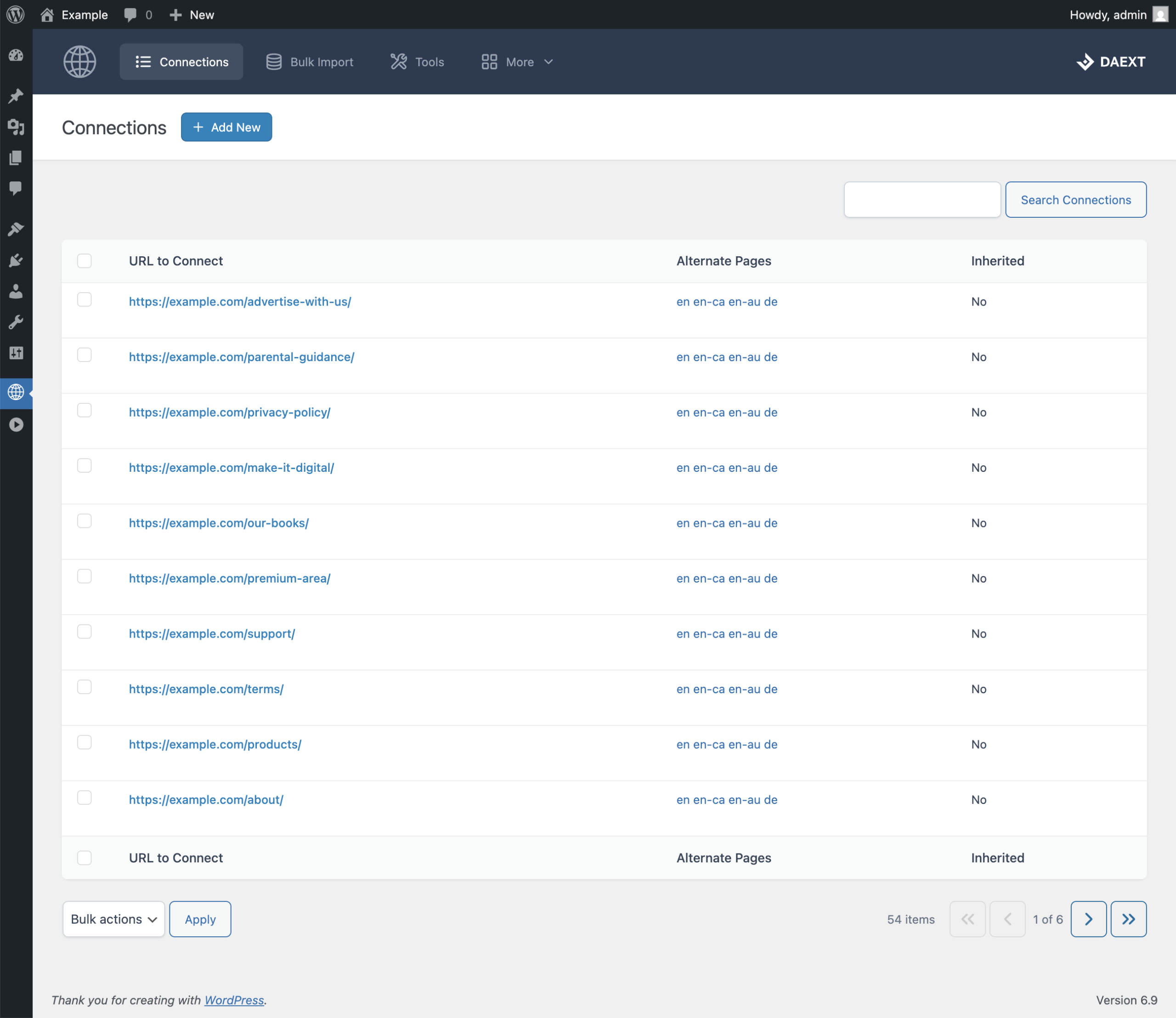
Hreflang Manager also includes a dedicated admin menu for centralized hreflang management. From this screen, you can browse all hreflang entries, search for specific items, and review how pages are connected across languages and regions.
This centralized interface is ideal for monitoring large sites or networks. You can duplicate existing entries to speed up configuration for similar pages, delete entries in bulk when making large structural changes, and distinguish between manually created entries and entries inherited from other sites through synchronization.
Each hreflang entry includes a complete list of alternate versions as clickable links, making it easy to review or edit related pages directly from one place.
To speed up data entry, languages and regions are automatically pre-selected based on the default configuration defined in the plugin options. This means you don’t need to manually choose language and region values every time you create a new hreflang entry, allowing for faster and more consistent configuration.
You can start creating hreflang entries from the interface that best fits your workflow.
When editing content, open the dedicated sidebar or meta box added by Hreflang Manager and configure the hreflang data directly from there. If you prefer working from a centralized hub, use the dedicated admin menu to create, edit, and review hreflang entries across the entire site or network.
This centralized menu is especially useful for administrators and editors who need to monitor hreflang data, search for specific entries, or check for inconsistencies without opening individual posts.