Finding and Monitoring Broken Links
The Broken Links menu scans the links in your published content and checks whether their destination URLs are still reachable, so you can find and fix dead links before they affect your visitors or your SEO.
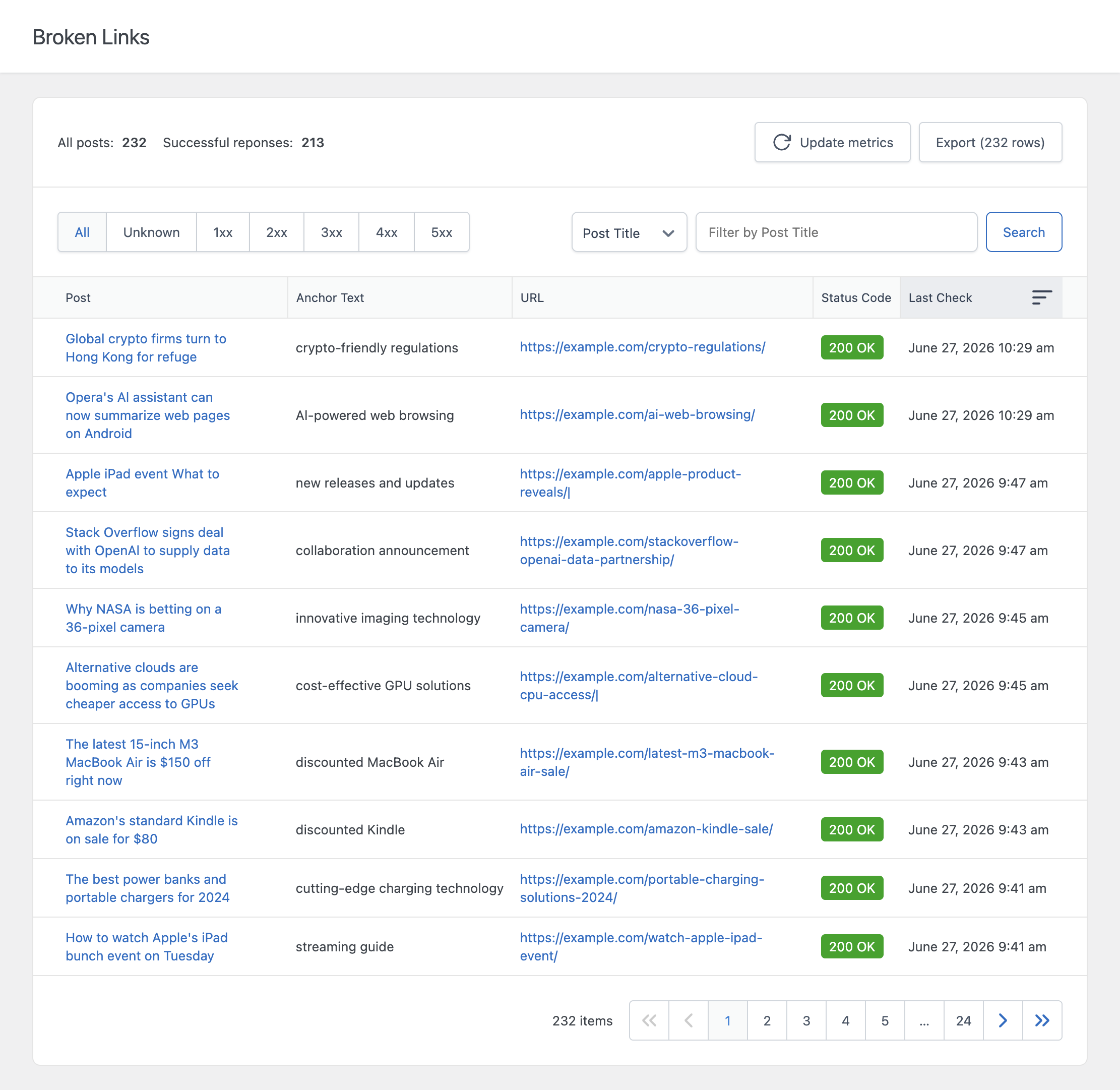
Columns
- Post – The post where the link is located
- Anchor Text – The visible text of the link
- URL – The destination URL of the link
- Status Code – The HTTP status code returned when the URL was checked
- Last Check – The date and time the URL was last checked
A URL that hasn’t been checked yet shows “Check in progress…” in the Last Check column instead of a date.
How the Check Works
The broken link check runs in two phases.
Phase 1: Building the List
When you trigger an update, the plugin scans every published post of the post types selected in the Broken Links Post Types option and extracts every link in their content, both internal and external. Links using the mailto: scheme are skipped, since they have no HTTP response to check. This builds a fresh list of links waiting to be checked.
Phase 2: Checking the URLs
A WP-Cron event then processes this list in batches, sending an HTTP request to each URL and recording the response status code. This happens gradually rather than all at once, since checking thousands of URLs in a single request would likely exceed your server’s execution time limit.
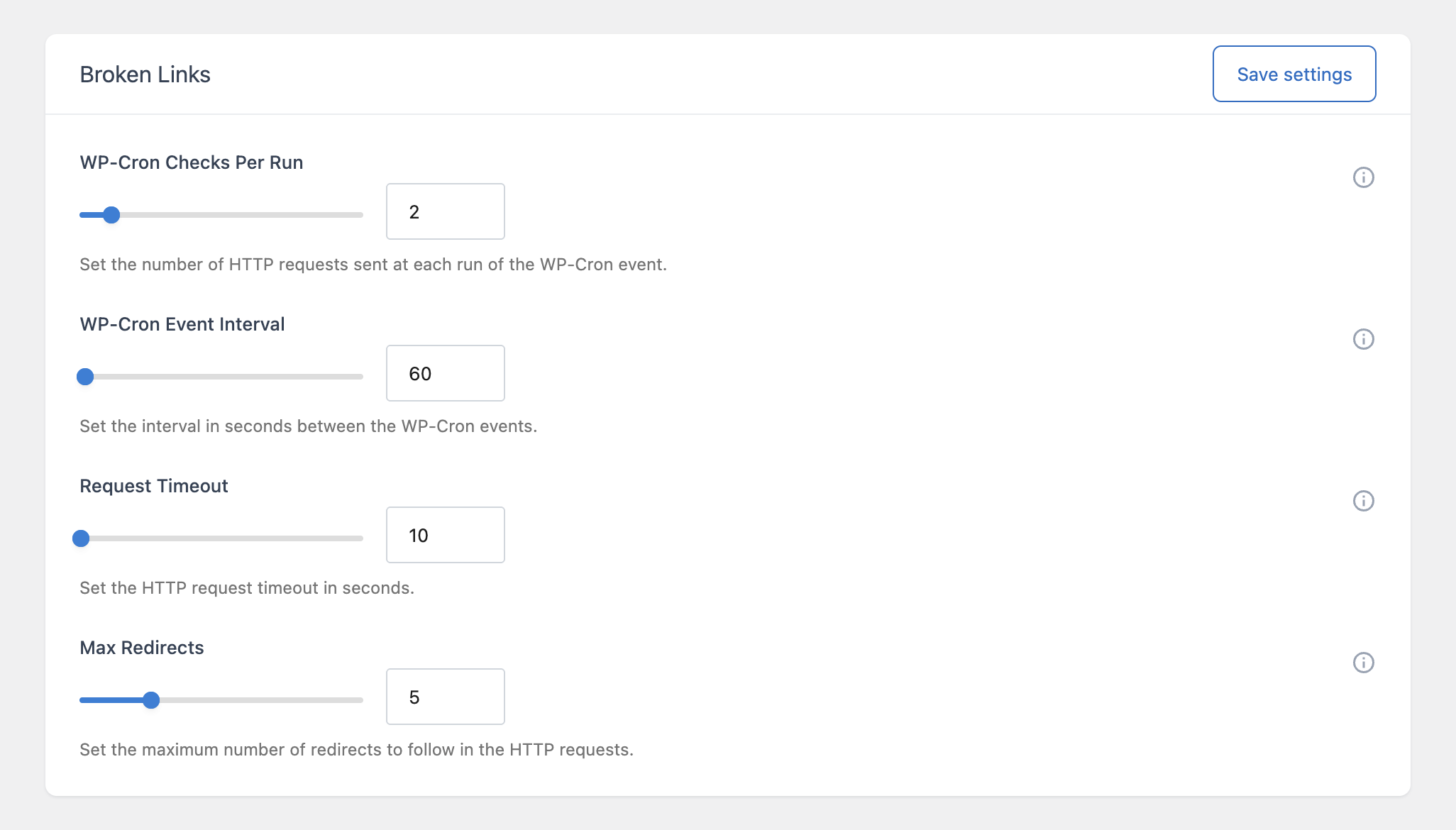
You can control how this process behaves using the following options in the Broken Links section of the Settings menu:
- WP-Cron Checks Per Run – How many URLs are checked each time the WP-Cron event runs
- WP-Cron Event Interval – How many seconds pass between each run of the WP-Cron event
- Request Timeout – How long the plugin waits for a response before giving up on a URL
- Max Redirects – How many redirects the plugin will follow before recording the final status code
On a site with many links, increasing the Checks Per Run value and decreasing the Event Interval will complete a full check faster, but at the cost of more frequent outgoing requests from your server.
Understanding Status Codes
Every checked URL displays the exact HTTP status code it returned, along with a short description. Status codes are grouped into ranges that follow the standard HTTP convention:
- 1xx – Informational responses
- 2xx – Successful responses, the URL is reachable
- 3xx – Redirection messages, the URL redirects to another location
- 4xx – Client error responses, for example 404 Not Found
- 5xx – Server error responses, the destination server encountered an error
A 2xx code generally means the link is healthy. Codes in the 4xx and 5xx ranges are the ones worth investigating, since they typically indicate the destination page no longer exists or the destination server is failing to respond correctly.
A Note on Redirects
A URL that returns a 3xx code is not necessarily broken. It may simply have moved to a new location, and your link continues to work correctly as long as the redirect resolves successfully. If you’d rather have the plugin follow redirects and report the final destination’s status code instead of the redirect itself, increase the Max Redirects value in the Settings menu.
Limiting the Scope of the Check
For performance reasons, the check only considers up to the number of most recent published posts defined by the Limit Posts Analysis option in the Settings menu, and only the post types selected in the Broken Links Post Types option.
Refreshing the Data
Use the Update metrics button to rebuild the list and start a fresh round of checks. Be aware that this restarts the check from the beginning, so previously checked URLs will briefly show “Check in progress…” again until the WP-Cron event reaches them.