Understanding Automatic Links Statistics
The Automatic Links tab of the Dashboard isolates the links generated specifically by your Auto Link Rules, separately from any links you placed manually. This makes it possible to evaluate the impact of your automatic linking strategy on its own, without manually placed internal links affecting the numbers.
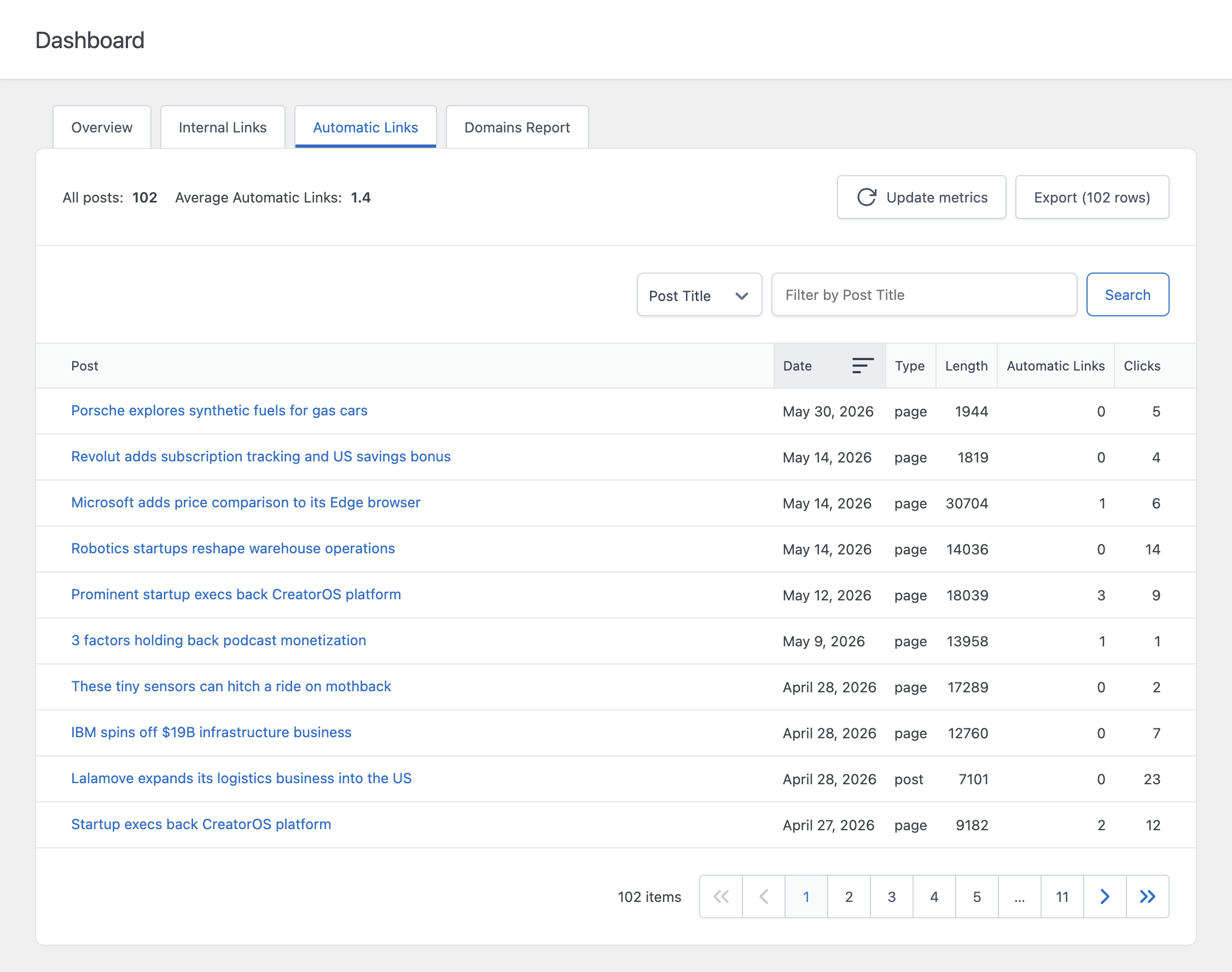
Columns
The table includes the following columns for every analyzed post:
- Post – The title of the post or page, with quick links to view it on the front end or open it in the editor
- Date – The publication date of the post or page
- Type – The content type, for example post or page
- Length – The content length of the post in characters
- Automatic Links – The number of links automatically generated in this post based on your Auto Link Rules
- Clicks – The number of clicks recorded specifically on the automatic links within this post
How This Differs From the Internal Links Tab
The Internal Links tab covers all internal links on a post, manual and automatic combined, and includes an optimization Status column. The Automatic Links tab is narrower in scope: it only counts links generated by your Auto Link Rules, and it includes links pointing to external domains as well as internal pages, since Auto Link Rules can target any URL.
Use this tab when you want to answer questions specific to your automatic linking setup, for example which posts are receiving the most automatically generated links, or which posts have very few despite matching several of your rules.
How Clicks Are Counted
The Clicks column in this tab only counts clicks on links that were generated automatically by an Auto Link Rule. Clicks on manually placed links are not included here, even if click tracking is enabled for the whole site. This data comes from the same underlying tracking records used by the Clicks menu, filtered down to automatic links only.
If you want to inspect individual click events rather than per-post totals, refer to the dedicated documentation on click tracking.
A Note on Zero-Result Posts
A post can have zero in the Automatic Links column for two different reasons: either no Auto Link Rule matches any keyword present in that post, or the post is excluded from automatic linking through the Enable option in its Automatic Links editor panel. If you expect a post to receive automatic links and it shows zero, check both possibilities before assuming your rule is misconfigured.
Refreshing and Filtering
Like the other Dashboard tabs, the data in this tab is cached and updated periodically. Use the Update metrics button to manually refresh the data, or adjust the Dashboard Data Update Frequency setting in the Settings menu to control how often it updates automatically. You can filter the table by any column and sort by clicking the column headers.