Configuring the Suggestions Algorithm
The Suggestions section of the Settings menu controls how the Internal Links Suggestions editor panel scores and selects the posts it recommends. This page documents each available option and how it affects the suggestions you see while writing.
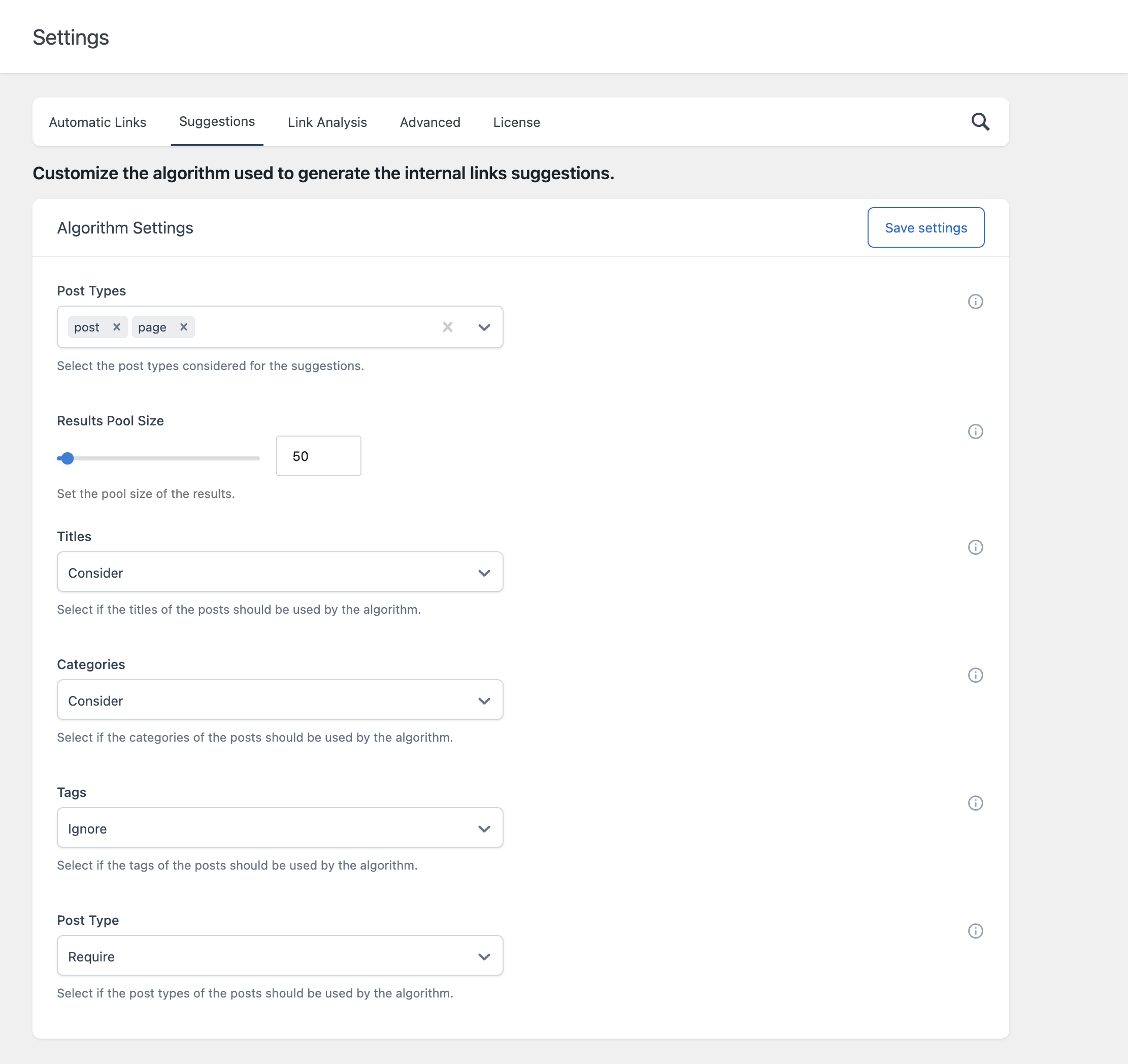
For a full explanation of how these settings are applied during scoring, refer to the dedicated documentation on the Internal Links Suggestions panel.
Algorithm Settings
- Post Types – Determines which post types are eligible to appear as suggestions in the first place. Leave this empty to consider all post types. This is separate from the Post Type scoring option below, which compares the suggested post’s type against the post you’re currently editing.
- Results Pool Size – Defines how many top-scoring candidates are kept as the eligible pool before five are randomly selected for display. A larger pool size introduces more variety between consecutive uses of Generate Suggestions, since the random selection draws from a wider set of high-scoring candidates. A smaller pool size makes the results more consistently the very highest scoring matches, with less variety run to run.
- Titles – Determines whether shared words between the current post’s title and a candidate’s title contribute to that candidate’s score. Available options are Consider and Ignore; there is no Require option for Titles, since requiring an exact word match in every title would be too restrictive for most sites.
- Categories – Determines how the post’s categories affect scoring. Require limits the candidate pool to only posts sharing at least one category with the current post. Consider includes a category match as a scoring bonus without excluding non-matching posts. Ignore removes category matching from the algorithm entirely.
- Tags – Behaves the same way as Categories, but compares the post’s tags instead.
- Post Type – Behaves the same way as Categories and Tags, but compares whether the candidate post shares the same post type as the post you’re currently editing.
Choosing Require vs. Consider vs. Ignore
These three settings work well together when you understand the tradeoff they represent:
- Require guarantees relevance on that specific dimension, but can produce no suggestions at all if too few posts satisfy the condition, especially in combination with other Require settings.
- Consider influences ranking without restricting the candidate pool, which keeps suggestions flowing even on smaller sites, at the cost of occasionally surfacing a less obviously related post.
- Ignore removes the signal entirely, useful if a particular dimension isn’t meaningful for your content structure, for example if you don’t use Tags consistently across your site.
If you’re getting too few or no suggestions, the most common fix is to loosen one or more Require settings to Consider.
A Practical Starting Point
For most sites, a reasonable starting configuration is:
- Titles: Consider
- Post Type: Consider
- Categories: Consider
- Tags: Ignore (unless your site uses tags consistently and meaningfully)
This produces a reasonably broad and relevant pool of candidates without risking zero results on smaller sites. As your content library grows, you can tighten these toward Require for more precisely scoped suggestions.