Understanding Link Equity
Link Equity estimates how much internal SEO value each page on your site accumulates from the internal links pointing to it. Pages that receive more internal links, and links from pages that themselves carry more equity, are estimated to have a stronger internal authority signal. This is conceptually similar to how search engines distribute ranking signals through a site’s internal link structure.
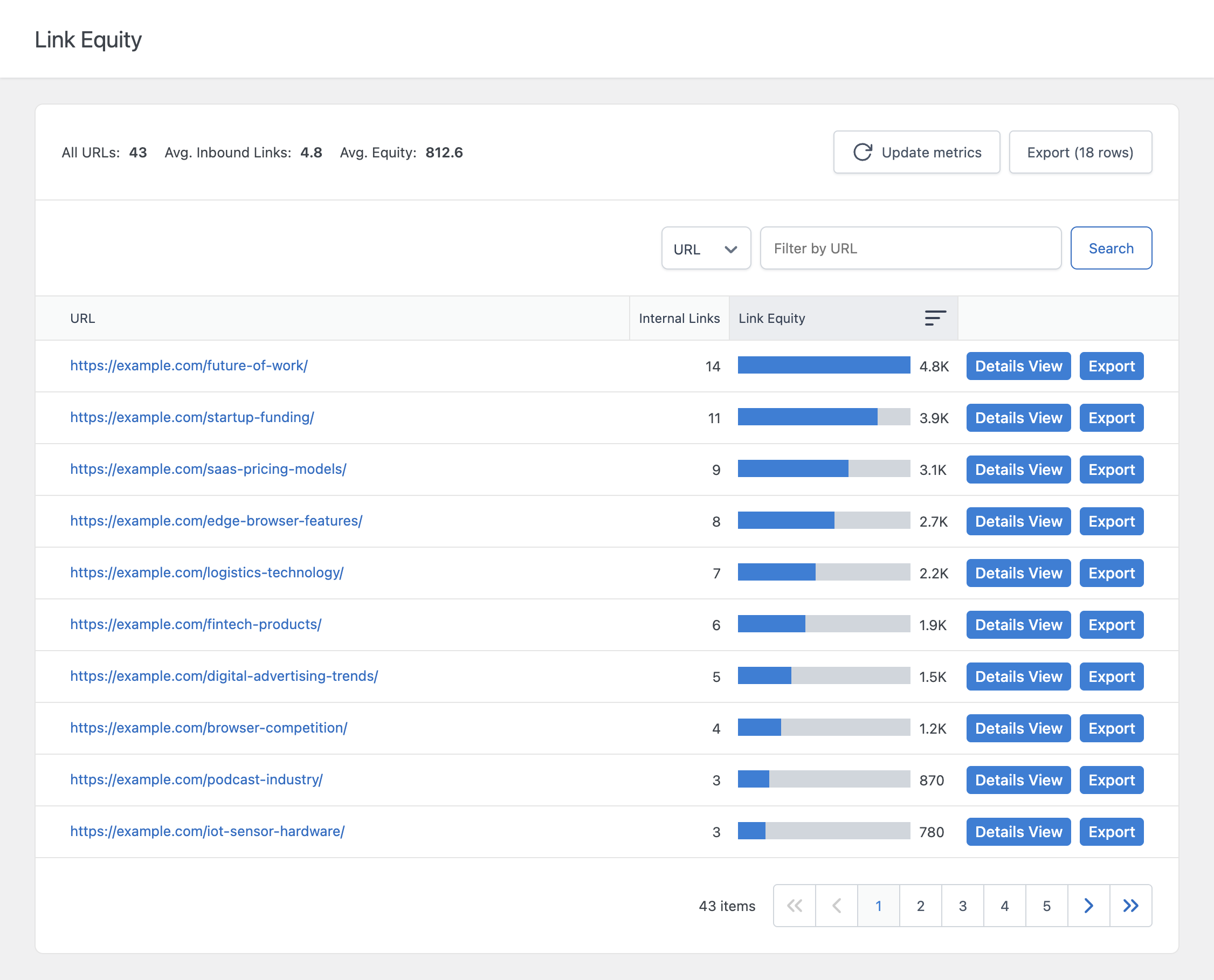
Columns
- URL – The destination page that is accumulating link equity
- Internal Links – The number of internal links pointing to this URL
- Link Equity – The estimated equity value for this URL, shown both as a number and as a proportional bar relative to the highest-equity URL in the list
Large equity values are abbreviated with K, M, B, or T suffixes for readability (for example, 12.4K instead of 12,400).
How Link Equity Is Calculated
Link Equity is calculated using three components: a base value assigned to each post, the number of links on that post, and a penalty based on each link’s position within the content.
1. Total Link Equity per Post
Every published post has a Total Link Equity value, which represents how much equity that post is able to pass through its outgoing links. This value can be set individually for each post using the Total Link Equity field in the Internal Links Settings editor panel. If a post doesn’t have a custom value set, the Total Link Equity (Default) option from the Settings menu is used instead.
2. Equity Per Link
The post’s Total Link Equity is divided evenly across every link in the post, internal and external alike:
Equity per link = Total Link Equity ÷ Total number of links in the postA post with a high Total Link Equity but many outgoing links distributes a smaller amount of equity to each individual link, since the total is spread thinner.
3. Position Penalty
Links that appear later in the content receive slightly less equity than links that appear earlier. This is controlled by the Penality per Position (%) option in the Settings menu, which reduces the equity passed by each link based on how many links precede it in the same post.
Example
Suppose a post has a Total Link Equity of 1,000 and contains 4 links. Each link starts with 250 equity (1,000 ÷ 4). If the Penality per Position is set to 10%, the second link loses 10% of 250 (25 units), the third link loses 20% (50 units), and so on. The first link in the post always receives the full per-link value, since no penalty applies before it.
Aggregating Equity per URL
Multiple posts often link to the same destination URL. The plugin sums the equity contributed by every internal link pointing to that URL, across every analyzed post, to produce the final Link Equity value shown for that URL.
Only manually placed internal links and links generated by your Auto Link Rules are counted. External links do not contribute to or receive Link Equity, since this feature is specifically about internal authority distribution.
Viewing Link Details
Click Details View next to any URL to see exactly which posts link to it, with the anchor text used and the equity contributed by each individual link.
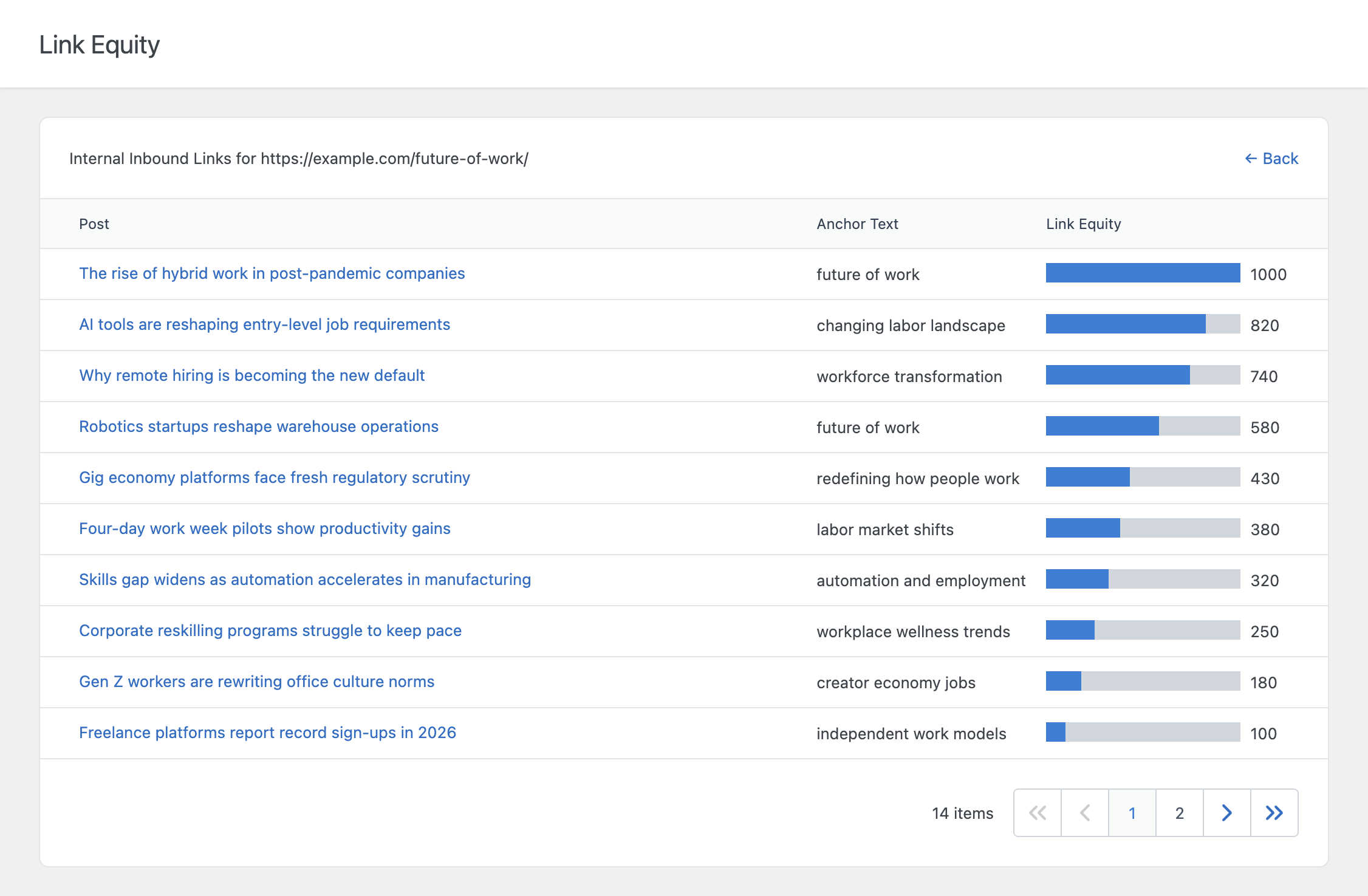
This is useful when a URL has unexpectedly high or low equity and you want to understand exactly which links are responsible.
URL Normalization
To avoid splitting equity across what is effectively the same page, the plugin can normalize URLs before aggregating equity:
- Remove Fragment Identifier – Treats
https://example.com/pageandhttps://example.com/page#sectionas the same URL - Remove URL Parameters – Treats
https://example.com/pageandhttps://example.com/page?ref=newsletteras the same URL
Both options are available in the Settings menu. The Remove URL Parameters option should be left disabled if your site relies on URL parameters to identify distinct pages, for example when pretty permalinks are not enabled.
Exporting Link Equity Data
Each URL row includes an Export button that downloads the link data associated with that specific URL.
Refreshing the Data
Like the other link analysis features, Link Equity data is cached and updated periodically. Use the Update metrics button to manually refresh the data, or adjust the relevant data update frequency setting in the Settings menu to control how often it updates automatically. Only published posts of the post types selected in the Link Equity Post Types option are included in the analysis.